
DOL Suspends Microsoft, Adobe, and Six IT Firms From PERM: What It Means for Form I-9
Read the article

On February 2, 2026 — one day before Haiti's Temporary Protected Status was set to expire — the U.S. District Court for the District of Columbia issued an order staying the termination. (Miot et al. v. Trump et al., No. 25-cv-02471-ACR, D.D.C.)
This means Haitian TPS beneficiaries remain authorized to work, and their Employment Authorization Documents (EADs) are extended by court order through March 15, 2026.
USCIS has confirmed specific I-9 instructions for employers. This is not a routine extension — the Department of Homeland Security is appealing the court order. Employers should monitor this situation and check back at uscis.gov regularly for updates.
This court stay extends the validity of Haiti TPS EADs with any of the following original expiration dates:
If an employee has a Haiti TPS Employment Authorization Card (Form I-766, category A12 or C19) with any of these dates, their authorization is extended through March 15, 2026 per court order. Review your I-9 records against this full list — not just employees with the most recent expiration date.
Do not create a new I-9. Update the existing record.
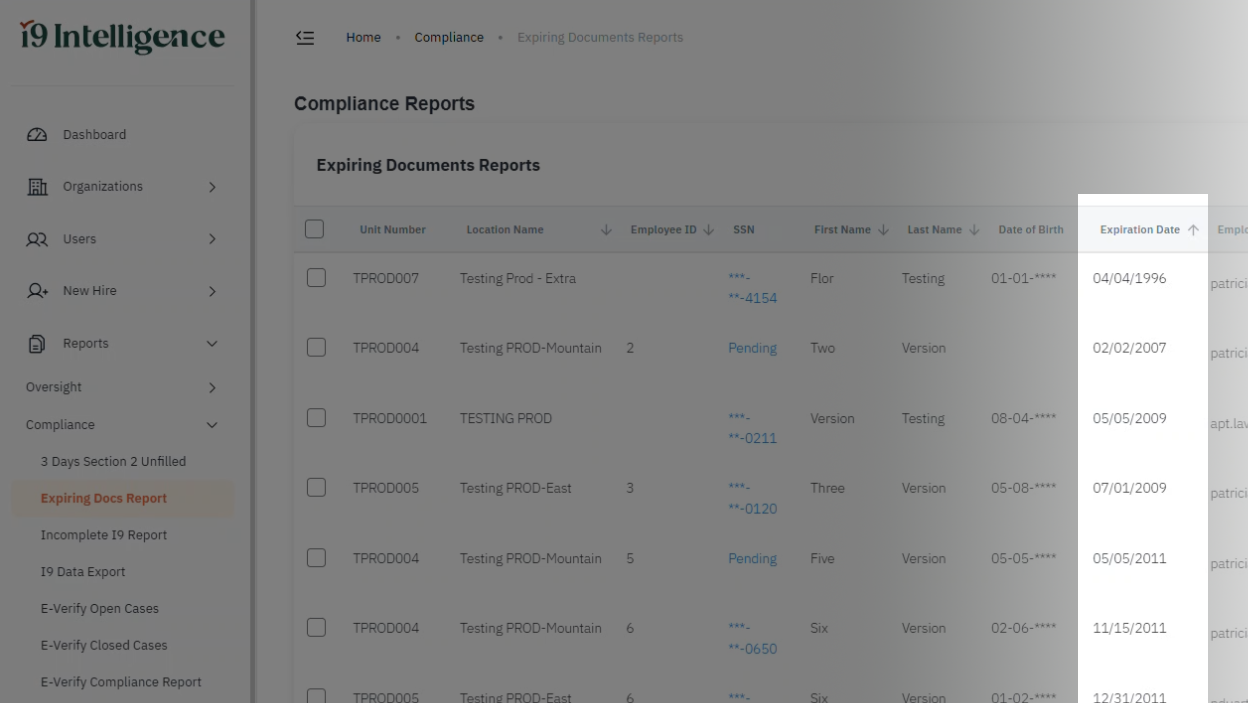
In i9 Intelligence, check the Expiring Documents dashboard or run the Expiration Date Report (Reports > Compliance > Expiring Docs Report). This report shows all employees with expiring documents — it does not filter by document type or country. Look for employees with expiration dates matching any of the dates listed above. Then open each record individually to verify the Work Authorization Card shows Country of Birth as Haiti and category code A12 or C19.
Confirm that the card recorded in Section 2 is a Work Authorization Card with:
Update the I-9 expiration date to 03/15/2026

Select the Section 2 tab on the right-hand side of the form and select Additional Information. Type:
TPS for Haiti: As per court order
Select Save Changes in Section 2.
You may also download the USCIS alert and TPS Haiti webpage and attach copies to the I-9 as supporting documentation — USCIS explicitly permits this.
Note for older I-9 form versions: If the employee's I-9 is on an older form version that does not have an Additional Information box in Section 2, create a separate document (e.g., a Word file) with the note “TPS for Haiti: As per court order” and upload it as an attachment to the I-9 record. The Additional Information box is available on form versions 8 and later — for anything older, use the attachment method.
i9 Intelligence offers remote I-9 verification — our compliance specialists handle Section 2 via video call, so your employees don't need to visit an office. Book a demo to see how it works.
The employee enters 03/15/2026 as the expiration date in Section 1. The employee's card will show 02/03/2026, but our system will not accept an expired date — enter the court-ordered extension date of 03/15/2026 instead.

A note on USCIS guidance: USCIS instructs employees to write “as per court order” in the Section 1 expiration date field. However, because our system requires a date value in this field, enter 03/15/2026 — this is the court-ordered extension date and is the correct equivalent.
The employee will present a Work Authorization Card with an expiration date of 02/03/2026 printed on the card. Record the card in Section 2.
Enter 03/15/2026 as the expiration date — not the date printed on the card.
The authorized representative signs and dates Section 2.
Select the Section 2 tab on the right-hand side of the form and select Additional Information. Type:
TPS for Haiti: As per court order
Select Save Changes in Section 2.
If your organization uses E-Verify, enter 03/15/2026 as the expiration date when creating the case. Use this date regardless of what is printed on the employee's card.
Unlike a standard regulatory extension, this authorization exists because of a court order that DHS is actively appealing. If the appeal succeeds, authorization for Haiti TPS beneficiaries could end before March 15, 2026. Employers should:
This is part of a broader pattern of TPS terminations — DHS recently terminated TPS for Burma as well. Employers with TPS-holding employees from multiple countries should review their I-9 records now.
We will publish updates here as the situation develops.
If you're an i9 Intelligence client, our support team can help you identify affected records and walk you through the update process in your account.
Call us at (713) 668-6200 (Mon–Fri, 8am–5pm CT), email support@i-9intelligence.com, or submit a ticket
If you're not yet a client and your team is handling TPS updates manually, situations like this — a court order issued the day before an expiration, different instructions for Section 1 and Section 2, and E-Verify implications — are exactly where errors happen. i9 Intelligence provides its own trained authorized representatives who handle Section 2 verification on behalf of your organization, so your HR team has an expert in their corner when compliance guidance like this comes through.
This article reflects USCIS guidance current as of February 2026, based on the court order in Miot et al. v. Trump et al., No. 25-cv-02471-ACR (D.D.C.) and official USCIS communications. Because DHS is appealing the court’s decision, this situation may change. Check uscis.gov for the latest updates. This article is for informational purposes only — consult legal counsel for guidance specific to your organization.