Article

Alien Registration Number: Where to Find It and Where It Goes on Form I-9

Software & Technology
1
minutes to read

An Alien Registration Number (A-Number) is a unique 7- to 9-digit number assigned by the Department of Homeland Security to noncitizens in the United States. If you are filling out Form I-9 — either as an employee completing Section 1 or as an employer verifying documents in Section 2 — you need to know what the A-Number is, where to find it on immigration documents, and which field it belongs in. Getting this wrong is one of the most common I-9 errors found in audits.

This guide covers where the A-Number appears on every relevant document, exactly how to find it step by step, how it differs from the USCIS (U.S. Citizenship and Immigration Services) Number and the Document Number, and where it goes on Form I-9. If you have a specific question, jump to the FAQ section below.

What Is an Alien Registration Number?

An Alien Registration Number — also called an A-Number or Alien Number — is a unique identifier that the Department of Homeland Security (DHS) assigns to noncitizens who have records in the U.S. immigration system. The number is 7 to 9 digits long and is always preceded by the letter "A" (for example, A-123456789).

DHS assigns A-Numbers to:

  • Lawful permanent residents (green card holders)
  • Conditional residents
  • Asylees and refugees
  • Employment Authorization Document (EAD) holders
  • Temporary Protected Status (TPS) beneficiaries
  • Anyone with a pending or approved immigration petition or application

The A-Number stays with the person for life. It does not change when a document is renewed, replaced, or reissued. If someone gets a new green card, a new EAD, or a new approval notice, the A-Number on every document will be the same.

The legal basis for the A-Number is in 8 CFR Part 264, which governs the registration of noncitizens. A-Numbers are created when DHS opens an immigration file for a noncitizen — through a petition, application, removal proceeding, or other contact with the immigration system.

Where to Find Your Alien Registration Number

The most common question we hear is simple: "Where is my alien registration number?" The answer depends on which document you have. Here is where to look on each one.

Permanent Resident Card (Green Card / Form I-551)

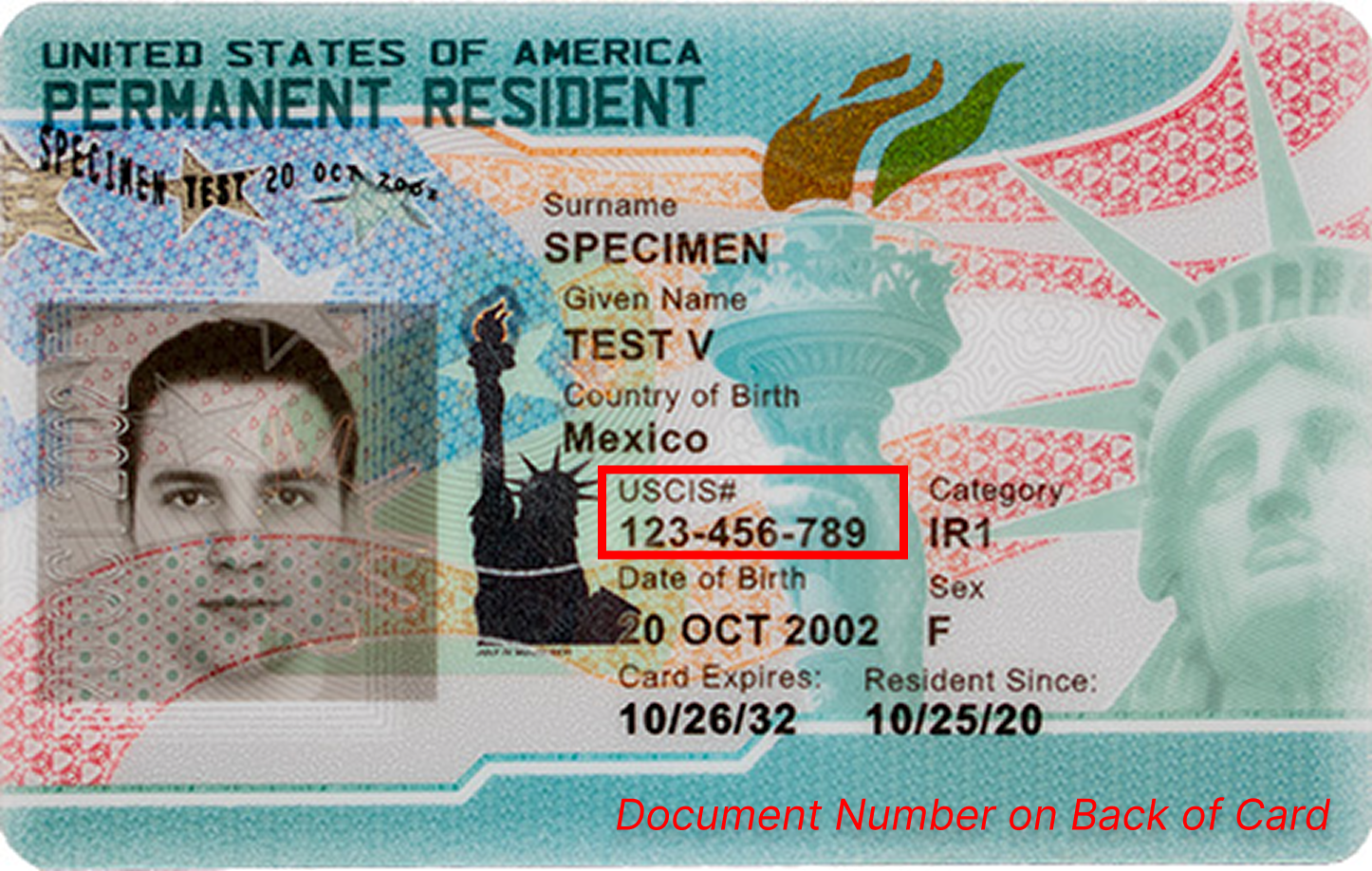
Look at the front of the card. The A-Number is printed in the field labeled "USCIS#" (or, on older cards, "Alien #"). It is a 7- to 9-digit number. The Document Number — a different identifier — is a 13-character code printed on the back of the card. Do not confuse the two.

Front of a Permanent Resident Card (Form I-551) with the A-Number (USCIS#) highlighted in a red box. The Document Number is on the back of the card.
Permanent Resident Card (Form I-551) — USCIS specimen. The A-Number (USCIS#) is on the front. The Document Number is on the back.

Employment Authorization Document (EAD / Form I-766)

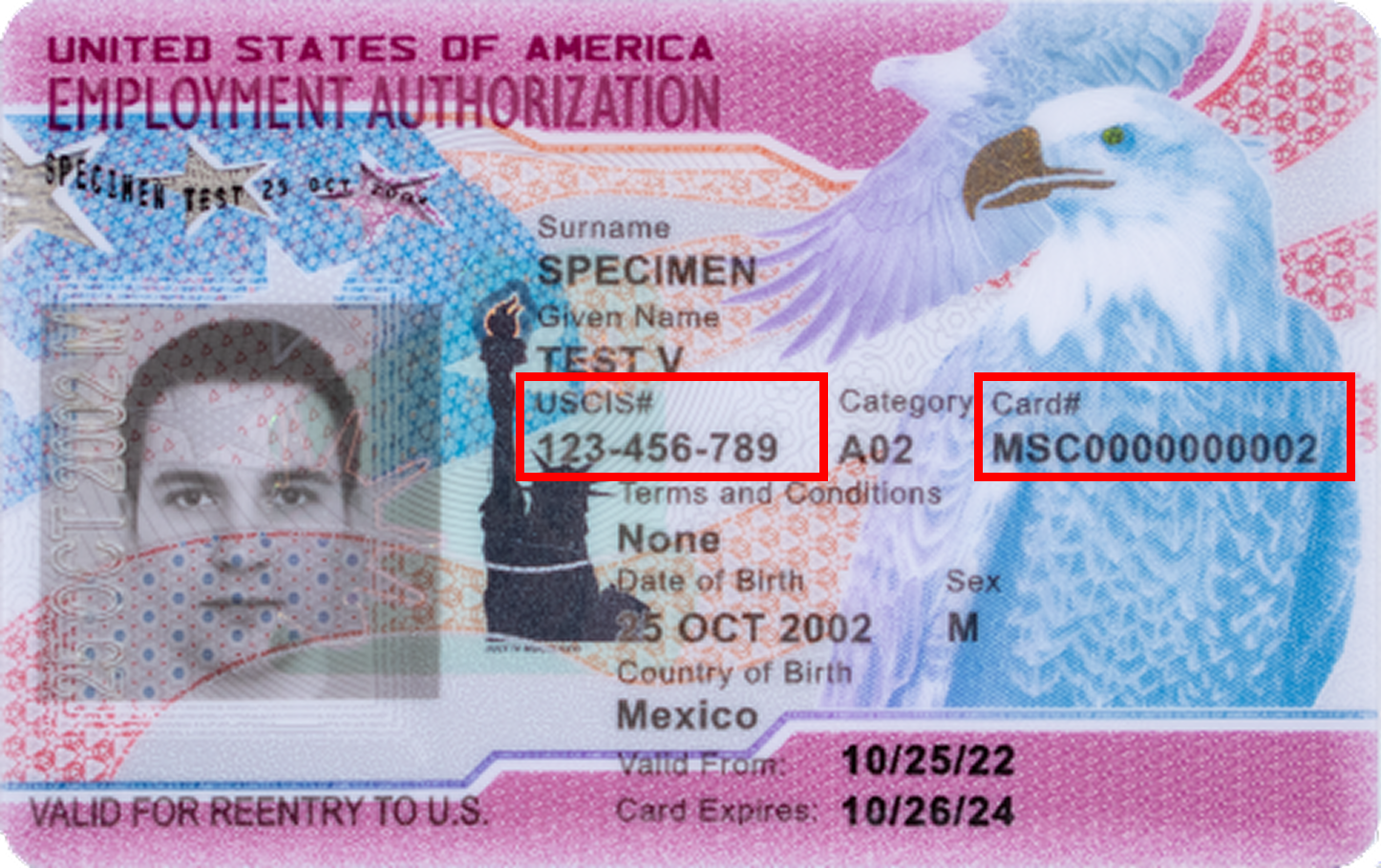
On the EAD, both the A-Number (labeled "USCIS#") and the Card Number appear on the front of the card. Read the labels carefully — this is where employers and employees most often record the wrong number. The A-Number starts with "A" followed by digits. The Card Number is a 13-character alphanumeric code.

Front of an Employment Authorization Document (Form I-766 / EAD) with the A-Number (USCIS#) and Card Number both highlighted on the front of the card.
Employment Authorization Document (Form I-766) — USCIS specimen. Both the A-Number and Card Number are on the front of the card.

For a complete guide to EAD auto-extensions, expiration rules, and how the EAD works on Form I-9, see our EAD Card for I-9 guide.

Approval Notice (Form I-797)

The A-Number appears in the upper-left area of the notice, near the receipt number. Look for the label "A-Number" or the format "A" followed by digits.

Immigrant Visa (Passport Stamp or Machine-Readable Immigrant Visa)

The A-Number is printed directly on the visa page in the passport. On a machine-readable immigrant visa (MRIV), it appears in the data block below the visa stamp.

I-551 Stamp (ADIT Stamp) or Temporary I-551 Notation

An I-551 stamp may appear directly in a passport or on a Form I-94. The A-Number is part of the stamp notation. Some lawful permanent residents whose green cards are pending present a temporary I-551 stamp as a List A document — the A-Number appears there too. For more on how temporary I-551 stamps work on Form I-9, see our Form I-551 guide.

Form I-94 Arrival/Departure Record

Not all Form I-94 records include an A-Number. Workers who entered on a nonimmigrant visa (H-1B, L-1, TN, etc.) may have an I-94 Admission Number but no A-Number. The I-94 Admission Number is an 11-digit number that is different from the A-Number — do not enter it in the A-Number field on Form I-9.

How to Find Your A-Number If You Have Lost Your Documents

If you cannot find any of the documents above, you have several options to recover your A-Number:

  • Create or log into your USCIS online account at my.uscis.gov — your A-Number is displayed in your account profile if you have one or more USCIS cases.
  • Check prior USCIS correspondence — any Form I-797 approval notice, receipt notice, or other letter from USCIS will display your A-Number in the upper-left area.
  • Ask your immigration attorney — if you used an attorney for any immigration matter, they will have your A-Number in their file.
  • Contact a prior employer — your A-Number was recorded in your previous Form I-9. Federal law requires employers to keep I-9s for at least three years after hire or one year after termination, whichever is later.
  • File a FOIA request — use Form G-639 (Freedom of Information/Privacy Act Request) to request a copy of your immigration file from USCIS. Processing can take several months.

For employers completing Form I-9 for an employee who cannot locate their A-Number, the employee is still required to present acceptable documents under List A, or List B plus List C. If they present a Permanent Resident Card or EAD, the A-Number will be on the document itself — so the employer can record it directly from the card.

Where Every Document Shows the A-Number — Quick Reference Table

Document Where to Find the A-Number Label on Document Format
Permanent Resident Card (Form I-551 / Green Card) Front of card "USCIS#" or "Alien #" A + 7–9 digits
Employment Authorization Document (Form I-766 / EAD) Front of card "USCIS#" A + 7–9 digits
Approval Notice (Form I-797) Upper-left area, near receipt number "A-Number" or "A#" A + 7–9 digits
Immigrant Visa (MRIV in passport) Data block on visa page "A-Number" in data block A + 7–9 digits
I-551 Stamp (ADIT stamp) in passport or on I-94 Stamped notation Embedded in stamp text A + 7–9 digits
Form I-94 (arrival/departure record) Not always present — many I-94s do not include an A-Number N/A for most nonimmigrants 11-digit I-94 number is different from A-Number

A-Number vs. USCIS Number vs. Document Number — What Is the Difference?

These three numbers cause more I-9 errors than almost anything else. Here is how they differ:

Number What It Is Example Where on Form I-9
Alien Registration Number (A-Number) Identifies the person. Assigned by DHS. Permanent — never changes. A-123456789 Section 1 — employee fills in
USCIS Number Same as the A-Number, minus the "A" prefix. Same identifier, different format. 123456789 Section 1 — same field, either format works
Document Number Identifies the physical card. Changes each time a new card is issued. 13-character alphanumeric code. SRC1234567890 Section 2 — employer fills in

The core rule: The A-Number identifies a person. The Document Number identifies a card. They are different numbers, they go in different sections of the form, and they are filled in by different people — the employee in Section 1, the employer in Section 2. Mixing them up is an auditable error.

Tip: If the number starts with the letter "A" followed by 7 to 9 digits, it is the A-Number. If you see a 13-character alphanumeric code, that is a Document Number. For a full breakdown of green card document numbers, see our Green Card Number for I-9 guide.

A-Number vs. Other Immigration Numbers

Beyond the Document Number and USCIS Number, there are three other numbers employees and employers commonly confuse with the A-Number. Each one identifies something different.

A-Number vs. Social Security Number (SSN)

The Social Security Number is a 9-digit number issued by the Social Security Administration for tax and benefits purposes. The A-Number is issued by DHS and identifies a person's immigration file. They are completely separate identifiers issued by different federal agencies. A noncitizen can have both numbers, one, or neither — and the SSN does not go in the A-Number field on Form I-9. E-Verify uses the SSN separately to check employment eligibility in the SSA database, in addition to the A-Number or other identifier from Section 1.

A-Number vs. I-94 Admission Number

The Form I-94 Admission Number is an 11-digit number assigned by U.S. Customs and Border Protection (CBP) when a noncitizen is admitted to the United States. It identifies the specific admission event — not the person. A nonimmigrant worker (H-1B, L-1, TN, O-1, etc.) may have an I-94 number but no A-Number. A lawful permanent resident who travels abroad will often have both. On Form I-9, these go in separate fields — an employee choosing "An alien authorized to work" in Section 1 can provide their A-Number or their I-94 number or their Foreign Passport Number — only one is required.

A-Number vs. Receipt Number (Form I-797)

A Receipt Number is a 13-character alphanumeric code printed on USCIS Form I-797 notices. It starts with three letters identifying the USCIS service center (for example, SRC, EAC, WAC, LIN, MSC, or IOE) followed by 10 digits. The Receipt Number identifies a specific petition or application — one person may have multiple Receipt Numbers over the course of their immigration history, but only one A-Number. On a Form I-797, the Receipt Number appears in the upper-left area just above the A-Number. The Receipt Number does not belong on Form I-9.

Need Help With I-9 Document Questions?

Document numbers are one of the most common I-9 errors we find in audits. Our compliance team has 27+ years of I-9 and E-Verify expertise and reviews documents every day. We walk employees and employers through every section — including remote verification via video call for distributed teams. Schedule a free compliance call.

Where the A-Number Goes on Form I-9

Section 1 — Employee Completes This

In Section 1, the employee attests to their citizenship or immigration status. If the employee selects either of these two options, they must provide their A-Number or USCIS Number:

  • "A lawful permanent resident" — Must enter their 7- to 9-digit A-Number or USCIS Number in the field provided. This is required — it cannot be left blank. According to the USCIS M-274 Handbook for Employers, conditional residents should also select this status and provide their A-Number.
  • "An alien authorized to work" — Must provide one of three options: (1) their A-Number or USCIS Number, (2) their Form I-94 Admission Number, or (3) their Foreign Passport Number and Country of Issuance. The employee provides whichever identifier appears on their documents — only one is required.

Asylees and refugees should select "An alien authorized to work," not "A lawful permanent resident" — even if they have an A-Number.

Section 2 — Employer Completes This

In Section 2, the employer (or an authorized representative) examines the employee's documents and records what they see. The A-Number does not go in the "Document Number" field in Section 2 — that field is for the Document Number on the physical card.

On a green card, the Document Number is a 13-character code on the back of the card. On an EAD, both the A-Number and the Card Number appear on the front — so read the labels before recording. Entering the A-Number in the Document Number field in Section 2 is an I-9 error.

The employer does encounter the A-Number again when creating an E-Verify case. E-Verify prompts for the employee's A-Number or USCIS Number — the same number the employee entered in Section 1. For employees who provided an I-94 number or foreign passport number in Section 1 instead of an A-Number, E-Verify handles those cases through a different path.

Common Mistakes With Alien Registration Numbers on Form I-9

1. Entering the A-Number in the Section 2 Document Number Field

This is the most frequent error. The employer sees the A-Number labeled "USCIS#" on the front of the green card or EAD and enters it in the Document Number field in Section 2. But these are different identifiers. On a green card, the Document Number is a 13-character code on the back of the card — nowhere near the A-Number. On an EAD, both numbers are on the front, making the confusion even easier to understand. The A-Number belongs in Section 1 only.

"Mixing up the A-Number and the Document Number is one of the most frequent errors we see in I-9 audits," says Patricia, Director of Compliance at i9 Intelligence. "On a green card, the A-Number is on the front and the Document Number is on the back — they're in completely different places. But on an EAD, both numbers are on the front of the card, so you really have to read the labels carefully. Employers confuse them constantly because both fields say 'number.'"

2. Confusing A-Number With USCIS Number

These are the same identifier in different formats. If the A-Number is A-123456789, the USCIS Number is 123456789. Either format is acceptable in Section 1 of Form I-9. There is no separate number to find — the USCIS Number is just the A-Number without the "A" prefix.

3. Leaving the A-Number Field Blank When It Is Required

If an employee selects "A lawful permanent resident" in Section 1, the A-Number or USCIS Number is required and cannot be left blank. If the employee does not know their number, they should check their Permanent Resident Card, EAD, approval notice, or any other USCIS correspondence. The same number appears on every USCIS document associated with their case.

4. Entering an I-94 Number in the A-Number Field

An I-94 Admission Number is an 11-digit number — different in length and format from the A-Number. Employees who select "An alien authorized to work" can provide either their A-Number or their I-94 number or their foreign passport number. These go in separate, distinct fields on Form I-9 and should not be mixed.

5. Assuming Every Noncitizen Has an A-Number

Not every work-authorized noncitizen has an A-Number. Many nonimmigrant workers — H-1B, TN, L-1, O-1, and similar categories — may have an I-94 Admission Number but no A-Number. In Section 1, those employees select "An alien authorized to work" and provide their I-94 Admission Number or Foreign Passport Number and Country of Issuance instead. The A-Number field stays blank for those employees.

Frequently Asked Questions

What is an alien registration number?

An Alien Registration Number (A-Number) is a unique 7- to 9-digit identifier assigned by the Department of Homeland Security to noncitizens in the U.S. immigration system. It is preceded by the letter "A" (for example, A-123456789) and stays with the person permanently — it does not change when a document is renewed or replaced. It appears on green cards, EADs, approval notices, and other USCIS documents.

Where can I find my alien registration number?

Your alien registration number is printed on your immigration documents. On a Permanent Resident Card (green card), look at the front of the card — it is labeled "USCIS#" or "Alien #." On an Employment Authorization Document (EAD), it is also on the front, labeled "USCIS#." On a Form I-797 approval notice, it appears in the upper-left area near the receipt number. If you have multiple USCIS documents, the number will be the same on all of them.

How do I find my alien registration number if I lost my card?

If you no longer have your green card or EAD, your A-Number may appear on older USCIS correspondence, approval notices (Form I-797), your immigrant visa page in your passport, or any prior I-94 printout that included one. You can also contact U.S. Citizenship and Immigration Services (USCIS) directly. If you are an employer trying to complete Form I-9 for an employee who does not have their card, ask the employee to locate any prior USCIS correspondence — the A-Number will appear on it.

Is the alien registration number the same as the USCIS number?

Yes. The USCIS Number and the Alien Registration Number are the same identifier in different formats. If your A-Number is A-123456789, your USCIS Number is 123456789. The "A" prefix is dropped. Both formats are acceptable on Form I-9 Section 1, and USCIS uses the two terms interchangeably.

Is the alien registration number the same as a Social Security number?

No. The Alien Registration Number is issued by the Department of Homeland Security and identifies a noncitizen's immigration file. A Social Security Number (SSN) is issued by the Social Security Administration for tax and benefits purposes. They are separate 9-digit numbers from separate federal agencies, and a noncitizen may have one, both, or neither. On Form I-9, the A-Number goes in Section 1 and the SSN goes in a different field — they are not interchangeable.

Is the alien registration number the same as the I-94 number?

No. The Form I-94 Admission Number is an 11-digit number issued by U.S. Customs and Border Protection that identifies a specific admission event into the United States. The A-Number is a 7- to 9-digit number issued by DHS that identifies the person's immigration file. Many nonimmigrant workers (H-1B, L-1, TN, etc.) have an I-94 number but no A-Number. On Form I-9, employees choosing "An alien authorized to work" can provide either number, but they go in separate fields.

What is an A-Number from USCIS?

"A-Number" is the shorthand for Alien Registration Number. USCIS uses both terms. The "A" in A-Number stands for "Alien" — it is the same 7- to 9-digit identifier that appears on green cards, EADs, and other USCIS documents. When you see "A#" or "USCIS#" on an immigration document, that is the A-Number.

Where is the alien registration number on a green card?

The A-Number is on the front of the Permanent Resident Card (Form I-551), labeled "USCIS#" or "Alien #." It is a 7- to 9-digit number starting with the letter "A." Do not confuse it with the Document Number, which is a 13-character code on the back of the card. For a full breakdown of green card numbers and Form I-9, see our Green Card Number for I-9 guide.

Do I need an alien registration number for Form I-9?

It depends on your immigration status. If you select "A lawful permanent resident" in Section 1, you must provide your A-Number or USCIS Number — it is required. If you select "An alien authorized to work," you can provide your A-Number, your I-94 Admission Number, or your Foreign Passport Number and Country of Issuance — whichever you have available.

What if an employee does not have an alien registration number?

Some work-authorized noncitizens do not have an A-Number — particularly workers on nonimmigrant visas (H-1B, TN, L-1, etc.) who have not had an immigrant petition filed on their behalf. In that case, the employee selects "An alien authorized to work" in Section 1 and provides their Form I-94 Admission Number or Foreign Passport Number and Country of Issuance instead. The A-Number field stays blank. This is not an error — it is the correct procedure for employees without an A-Number.

What is the difference between an alien registration number and a document number?

An Alien Registration Number (A-Number) identifies the person — it is permanent and does not change across documents. A Document Number identifies the physical card and changes every time a new card is issued. On Form I-9, the A-Number goes in Section 1 (completed by the employee). The Document Number goes in Section 2 (completed by the employer). Entering the A-Number in the Section 2 Document Number field is a common and auditable I-9 error.

Does the "Valid for work only with DHS authorization" stamp on a Social Security card affect the A-Number?

Not directly — but it matters for Form I-9. A Social Security card stamped "Valid for work only with DHS authorization" is not an acceptable List C document on its own. The employee must present a different document to establish employment authorization. Their A-Number, however, is unaffected — it is a separate identifier that appears on their USCIS documents, not their Social Security card. For more on what the DHS authorization stamp means on Form I-9, see our Valid for Work Only with DHS Authorization guide.

Who has an alien registration number?

DHS assigns an A-Number to any noncitizen with an immigration file. This includes lawful permanent residents (green card holders), conditional residents, asylees, refugees, EAD holders, Temporary Protected Status beneficiaries, and anyone with a pending or approved petition or application. U.S. citizens do not have A-Numbers. Nonimmigrant workers on H-1B, L-1, TN, or similar visas may or may not have one — a petition filed on their behalf typically creates an A-Number, but a visa stamp alone does not.

Is the alien registration number public?

No. The A-Number is considered sensitive personal information and is protected under privacy rules. Employers are required to safeguard A-Numbers collected on Form I-9 under the same standards as other personal identifiers. Do not post or share A-Numbers outside of the specific business processes that require them (Form I-9, E-Verify case creation, immigration filings).

Need Help?

If you have questions about alien registration numbers, USCIS numbers, or any other I-9 document question, our compliance team is ready. We have processed hundreds of thousands of I-9s and resolve document questions every day.

Call us at (713) 668-6200 (Mon–Fri, 8 AM – 5 PM CT), email support@i-9intelligence.com, or submit a support ticket.

Not sure how your I-9 program stacks up? Assess your organization's compliance exposure with our free I-9 Risk Calculator.

This guide is current as of April 2026. Alien Registration Number rules are governed by 8 CFR Part 264 and the USCIS M-274 Handbook for Employers. For the most current Form I-9 requirements, consult USCIS I-9 Central.