
Does a USCIS A-Number Change? What Actually Changes on New Cards
Read the article

Someone on the hiring team heard two things this year: there is a new I-9, and ICE got stricter. Both are half right.
There is no 2026 edition of Form I-9. The form you should be using is the 01/20/25 edition, the only version allowed for new hires since August 1, 2026. What did change in 2026 is enforcement. ICE's March fact sheet moved a pile of common paperwork misses from "10 days to fix" to immediate fines.
Download the current Form I-9 (PDF) from USCIS
USCIS published a revised Form I-9 with an edition date of January 20, 2025. The changes are small compared with the August 2023 overhaul, but they are the version you have to match.
The attestation checkbox in Section 1, Box 4 was changed from "A noncitizen authorized to work" back to "An alien authorized to work." That language matches the Immigration and Nationality Act. Employees selecting this box now use the updated wording on the 01/20/2025 form.
If you have I-9s completed on the 08/01/2023 form with the "noncitizen" language, those forms are still valid. You do not need to redo them.
The descriptor for List B identity documents was updated from "gender" to "sex" to align with federal terminology standards.
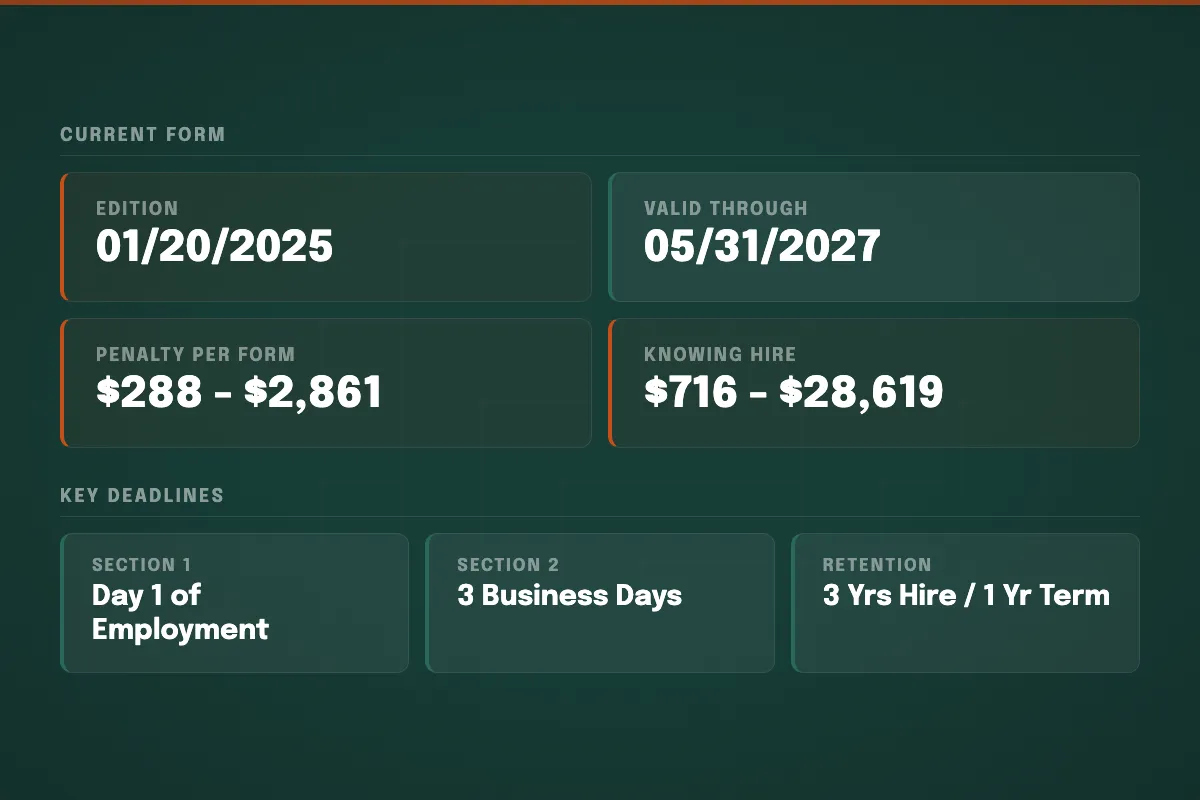
The 01/20/2025 edition expires 05/31/2027. Always check the expiration date in the upper-right corner of the form before using it. An expiration date other than 05/31/2027 means you are looking at an outdated edition.
The core structure of Form I-9 did not change in this edition. Section 1, Section 2, Supplement A (Preparer/Translator Certification), and Supplement B (Reverification and Rehires) all function the same way. Acceptable documents (Lists A, B, and C) are unchanged. The remote examination procedure rules are unchanged.
As of August 1, 2026, employers must use only the Form I-9 version showing the 05/31/2027 expiration date, which corresponds to the 01/20/2025 edition. The rule is keyed to the expiration date printed in the upper-right corner of the form, not the edition date:
How i9 Intelligence handled this transition: All customers on our platform were automatically switched to the 01/20/25 edition on August 1, 2026. No HR tickets. No chance a system quietly served the wrong form on a new hire. Form-edition transitions are our job, not yours. If you are not sure whether your current system made the switch cleanly, talk to our compliance team. A 15-minute call will tell you where you stand.
The form itself barely moved. The scoring of mistakes did. On March 16, 2026, U.S. Immigration and Customs Enforcement (ICE) updated its Form I-9 Inspection fact sheet with no Federal Register notice. Errors that used to be technical (at least 10 business days to correct after a Notice of Inspection) are now listed as substantive: ICE can cite them immediately.
These are the ones we still see on files we review:
| Error | Before March 2026 | Now |
|---|---|---|
| Missing date of birth (Section 1) | Technical | Substantive |
| Missing date of hire (Section 2) | Technical | Substantive |
| Undated Section 1 or Section 2 certification | Technical | Substantive |
| Missing employer or authorized representative title (Section 2) | Technical | Substantive |
| Preparer/translator gaps on Supplement A | Technical | Substantive |
| Spanish-language Form I-9 used outside Puerto Rico | Technical | Substantive |
| Missing document info even if you kept a legible photocopy | Technical | Substantive |
That last row is the one that surprises people. If Section 2 is missing a document number or expiration date, you used to be able to fill it in from the photocopy during the 10-day window. That carve-out is gone.
Electronic I-9 systems and remote examination got the same treatment. It is now a substantive violation if your software fails the audit-trail, signature, or security standards in 8 C.F.R. § 274a.2. Using the alternative remote procedure without checking the box in Section 2, or without being an active E-Verify participant at the time, is also substantive.
Using an outdated form version at the time of completion is still technical. You still get at least 10 business days to correct it after a Notice of Inspection. Uncorrected technical failures become substantive. Paperwork fines are $288 to $2,861 per form.
The rest of the 2026 enforcement picture sits around that fact sheet. In 2025, ICE's Notice of Inspection rate ran at least ten times 2024's pace. ICE added more than 12,000 officers by January 2026. An April 2025 IRS memorandum of understanding gave investigators a path to about 1.28 million flagged taxpayer records. When a Notice of Inspection lands, you have 3 business days to produce the forms. For the full reclassification list, see our guide to the ICE reclassification of substantive violations. For the running log of raids and audits, see the ICE Worksite Enforcement Tracker.
A missing hire date is no longer a 10-day courtesy. Use the I-9 Risk Calculator for a 60-second read on exposure, or talk to our compliance team.
After a form-edition transition, two questions come up on nearly every HR team's desk: Do we have to redo forms completed on the older edition? and How do we know our system is even generating the right form?
Old-edition I-9s already on file are still valid. Forms completed on the 08/01/2023 edition (either printing) or earlier accepted editions are grandfathered. You do not need to redo them. Retention rules and reverification obligations continue to apply normally. Using an old edition is a problem only if you used it to complete an I-9 after August 1, 2026.
Do this quick post-transition self-check:
Vendor form updates fail more often than HR teams expect. Use the I-9 Risk Calculator if you want a 60-second read on exposure, or talk to our team. We handle the entire I-9 process, including transitions like this one. For a full step-by-step audit, see our I-9 Self-Audit Playbook.
"Every I-9 form transition surfaces the same pattern," says Patricia Duarte, Director of Compliance at i9 Intelligence. "HR teams assume their electronic system updated automatically, and usually it did. I have reviewed audits where a vendor missed the switch by weeks and no one caught it until an inspector asked. A five-minute test I-9 in your own system is the fastest way to know where you stand."
To verify the Form I-9 you are holding is the current edition, look at the bottom-left corner of the form, not the expiration date at the top. Two dates appear on every Form I-9, and they are not the same thing:
For a deeper walk-through of verifying your edition and what to do if a self-audit turns up problems, see our guide to verifying you are using the current Form I-9 edition.
Form I-9 has two main sections and two supplements.
Who completes it: The employee (or a preparer/translator on the employee's behalf).
Deadline: Must be completed no later than the first day of employment, the day the employee starts work for pay.
The employee provides their full legal name, address, date of birth, and Social Security number (optional unless the employer participates in E-Verify). They then attest to their citizenship or immigration status by selecting one of four boxes:
The employee signs and dates the form. If a preparer or translator assisted, they complete Supplement A.
Who completes it: The employer or an authorized representative.
Deadline: Must be completed within 3 business days of the employee's first day of work for pay.
The employer physically examines the employee's original identity and work authorization documents. The employee may present:
The employer records the document title, issuing authority, document number, and expiration date in Section 2. They then sign and date the form, certifying that the documents appear genuine and relate to the employee.
Important: Employers cannot specify which documents an employee must present. Requiring specific documents, such as asking for a passport or green card, is document abuse under the INA, even if well-intentioned.
Used when someone other than the employee helps complete Section 1. Each preparer or translator must sign and provide their name and address.
Supplement B replaced the former "Section 3" in the August 2023 revision. It covers two situations:
On or before the employee's first day of work:
Within 3 business days of the employee's start date:
Remote workers or multiple locations? If your company is enrolled in E-Verify, you can use the alternative remote examination procedure to complete Section 2 via live video instead of in person. If you are not enrolled in E-Verify, an authorized representative must physically examine documents on-site. We offer both a remote verification service and a nationwide authorized representative network to handle Section 2 for you.
Note on business days: "Business days" means days the employer is open for business. If your company operates on weekends (manufacturing, healthcare, hospitality), then Saturday and Sunday count as business days. A Friday hire at a 7-day-a-week operation means Section 2 is due by Monday, not Wednesday.
Exception: If an employee is hired for less than 3 business days, both Section 1 and Section 2 must be completed on the first day of employment.
If your company participates in E-Verify, whether voluntarily or because of a state mandate or federal contract requirement, you must create an E-Verify case within 3 business days of completing Section 2. E-Verify electronically compares the information on the I-9 against government databases.
If the employee presents List B and List C documents (rather than a single List A document), the List B document must include a photograph when using E-Verify.
Document copies are required for E-Verify. You must submit document information as part of the E-Verify case, which means you need copies of the documents your employee presented. Retain copies (front and back) of all Section 2 documents. If you use the alternative remote examination procedure, document copies are mandatory and must be kept for the full retention period. Having copies on file also makes it significantly easier to respond to Tentative Nonconfirmations or ICE audits.
Retain the completed Form I-9 for whichever is later:
If you are unsure when to destroy a specific I-9, use our free I-9 Retention Calculator to find the exact date.
The penalty amounts below are the current figures as of 2026, reflecting the most recent DHS inflation adjustment published in the Federal Register on January 2, 2025.
Incomplete, missing, or improperly completed I-9 forms:
Penalties are assessed per form. A company with 50 I-9s containing errors faces potential fines of $14,400 to $143,050.
Knowingly hiring or continuing to employ workers not authorized to work in the United States:
These penalties are per unauthorized worker, not per form, and they stack on top of paperwork fines.
Requiring specific documents, rejecting valid documents, or treating employees differently based on citizenship status: $288 to $2,861 per violation.
For the complete penalty breakdown with examples, see I-9 Penalties in 2026: Every Fine Amount Employers Need to Know.
Since August 2023, employers enrolled in E-Verify can use an authorized alternative procedure to examine I-9 documents remotely, meaning the employee does not need to physically present their documents in person. This is a permanent rule, not a temporary COVID-era exception.
Many employers outsource Section 2 verification to a trained authorized representative rather than having internal staff manage it. This is particularly common for companies with remote workers, multiple locations, or no HR person on-site.
i9 Intelligence provides remote Section 2 verification as a managed service. Our US-based team handles the live video examination, document review, and Section 2 completion on your behalf.
Employees choose which documents to present. Employers cannot request specific documents.
For detailed guidance on specific documents, including where to find the numbers you need for Section 2, see our guides to the EAD Card on Form I-9 and Alien Registration Numbers on Form I-9.
Late Section 2 is still the finding we see most. The three-business-day clock is not three calendar days, and it is not "when we get around to it." Asking for a passport or a license is the next one: the employee chooses, and specifying documents is document abuse.
The rest of the pile is originals vs photocopies (certified birth certificates are the exception), missed Supplement B reverification before work authorization expires (now a substantive miss, not a paperwork courtesy), using an outdated edition on a post-August-1 new hire, and keeping forms too short or too long. Retention is 3 years from hire or 1 year after termination, whichever is later. For the audit sequence, see our I-9 Self-Audit Playbook.
The current Form I-9 is the 01/20/25 edition, valid through 05/31/2027. As of August 1, 2026, this is the only edition acceptable for new hires. There is no separate "2026 edition." The 01/20/2025 form is the version employers use throughout 2026 and into 2027.
No new edition was released in 2026. The current version is the 01/20/25 edition that USCIS published in January 2025, which became the only acceptable edition for new hires on August 1, 2026.
Yes. On March 16, 2026, ICE updated its Form I-9 Inspection fact sheet and reclassified several common errors from technical to substantive, including missing dates of birth, missing hire dates, undated certifications, missing employer titles, preparer/translator gaps, Spanish forms used outside Puerto Rico, and missing Section 2 document data even when a photocopy is on file. Those errors can now be fined without a 10-day correction window. Using an outdated form version is still technical.
You can download the current Form I-9 directly from the USCIS website. Always download the form from USCIS. Third-party copies may be outdated. The current version will show "Edition 01/20/25" in the lower-left corner and an expiration date of 05/31/2027 in the upper-right corner.
Complete a test I-9 in your system and check the bottom-left corner of the generated form. It should read "Edition 01/20/25." The upper-right expiration date should read 05/31/2027. If either is wrong, your vendor did not complete the transition and you should contact them immediately. i9 Intelligence customers were automatically migrated to the 01/20/25 edition on August 1, 2026 with no HR action required. For other systems, verify with your vendor.
Yes. Every employer in the United States must complete Form I-9 for every employee they hire, regardless of company size, the employee's citizenship status, or whether the position is full-time, part-time, or temporary. The only exceptions are independent contractors (1099 workers) and casual domestic workers performing sporadic household work.
Yes, if your company is enrolled in E-Verify and in good standing. The DHS alternative procedure rule, made permanent in August 2023, allows employers to examine Section 2 documents via live video call instead of in person. You must retain copies of the documents (front and back) and check the "Alternative Procedure" box on the form.
Using an outdated form version is a technical (paperwork) violation. Under ICE's March 2026 guidance, technical failures generally come with at least 10 business days to correct, but uncorrected technical failures become substantive, and each substantive violation can be cited at $288 to $2,861 per form. The fix is prevention: confirm every new I-9 completed on or after August 1, 2026 shows the 05/31/2027 expiration date.
No. Forms already completed on prior valid editions (including the 08/01/2023 edition) remain valid and do not need to be redone. Retention and reverification obligations continue normally.
Retain each Form I-9 for whichever is later: 3 years after the hire date, or 1 year after the date of termination. Use our free I-9 Retention Calculator to determine the exact destruction date for any employee's I-9.
Paperwork violations (errors, omissions, missing forms) carry penalties of $288 to $2,861 per form. Knowingly hiring unauthorized workers carries penalties of $716 to $28,619 per worker, depending on whether it is a first, second, or subsequent offense. These amounts reflect the January 2025 DHS inflation adjustment.
Whether you need help completing I-9s for new hires, auditing files against the March ICE list, or catching reverification deadlines, our team has been doing this for 28 years.